Your folders. Your files. No cloud required.
A quiet audiophile player for music you already own. Bit-perfect Exclusive and DoP on Mac. Load the AU and AUv3 plugins you already have — on the Deck, not in another host.
No streaming · No account · AUv3 on the Deck · Shared by default · Exclusive when the DAC is ready
Audiophile software loves jargon. We don’t. If you are unsure, leave Shared on — that is the daily driver, on every device.
Plays like any other app. Calls, YouTube, speakers, Bluetooth, AirPlay still work. This is the default, and the only honest path for anything that is not a dedicated DAC.
Mac only, with an external DAC. Audio Harbor takes over the DAC so the file’s sample rate stays as-is. Other apps go silent; set the volume on the DAC. DSD files are converted to PCM.
Mac only. Everything Exclusive does — and DSF, DFF, and SACD ISO (including DST) reach the DAC as real DSD via DoP. Pick it only if your DAC plays DSD. No separate DSD setting: the output mode decides.
No external DAC connected? Exclusive and DoP grey out and Shared takes over — plug the DAC back in and your choice returns on its own. Pick the device in Settings — music to the DAC, system sounds stay on the Mac speakers — and switch device or mode while the song plays. Effects on the rack keep the DAC exclusive at the file’s rate (Exclusive · FX), but processed sound is not bit-perfect — only the empty rack is, and we will not pretend otherwise. More in the FAQ.
No server. No login. Point at the folders you already keep, and play.
Connect the discs, NAS mounts, or iCloud folders that hold your library. Audio Harbor indexes them locally — titles, artwork, search — and stays out of the cloud.
Browse by album, artist, or folder. Queue an album onto the Deck. Gapless PCM. The format badge tells you what is actually leaving the app.
On Mac, with a USB DAC you trust, switch Output to Exclusive. Sample rate follows the file. Built-in speakers stay on Shared — as they should.
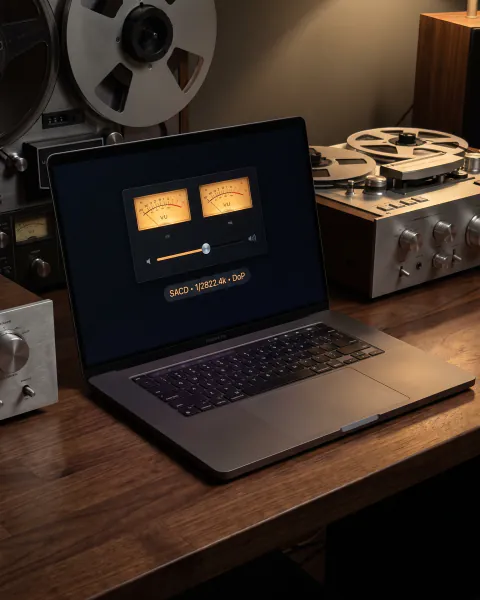
The player is a listening room, not a mixer. Catalogue, Deck, Settings. Large artwork. Analog VU when the music is moving. Nothing competing for the downbeat.
Deck, Catalogue, and Settings — the same three tabs as on the Mac. Browse and search from the couch, file songs into playlists and labels, change Output on the Mac, and set the DAC's own level with the volume buttons so the file stays bit-perfect. Local network only, no account, free.
Features earn their place. If it does not help you hear the file, it does not sit on the Deck.
Security-scoped bookmarks so the library survives a restart. Incremental index, search, rebuild when you ask — not a background circus.
Hog mode, sample-rate match, 24-bit HAL path. Exclusive is for a known DAC. We will not silently resample on that path.
Output DoP sends DSD as DoP to a DSD DAC. Every other path gets a clean PCM conversion — flat to 25 kHz, with a level setting so it plays as loud as DoP — labelled in the UI. No fake 1-bit into laptop speakers.
AU and AUv3 inserts on the Deck. The plugins you already own — EQ, room correction, headphone correction — sit on the player. See the rack.
Album, artist, folder, playlists, queue. M3U / M3U8 playlists in from foobar, VLC, Roon, or Music — and back out. Lock screen and media keys. The music is yours; we do not recommend a lifestyle.
No streaming services. No DRM Apple Music library. No telemetry of what you play. Privacy is the default, not a setting.
On Mac, UPnP / DLNA players such as a Devialet Expert sit under Network Players, separate from This Host. Radios switch with the pick: Shared / Exclusive / DoP for a USB DAC; Wi‑Fi friendly, Full, or DSD, SACD, DoP when the player lists DSD — then those files go untouched. Or share the library, and a DLNA app on your iPhone plays it.
Audio Harbor is a host. Load the AU and AUv3 effects you already use in Logic, GarageBand, or AUM — as inserts on the Deck, while the record plays.
Any stereo Audio Unit effect — AUv3 extensions and classic AU components. The same units other Apple hosts see. Add from the rack, open the plugin’s own editor, keep the settings after quit.
AUv3 effects run outside the player. Classic AUs that are not sandbox-safe — most commercial ones — run in macOS’s own Audio Unit host, not inside Audio Harbor. A plugin that misbehaves takes itself down, not your listening.
With Exclusive or DoP on a DAC, a loaded rack keeps the DAC to itself at the file’s sample rate — no system mixer, no macOS resampling. Only the plugin changes the sound. Clear the inserts when you want the DAC bit-perfect or DSD via DoP again.
The rack sits under Now Playing. Search the installed units, drop one in, reorder, bypass. No separate “FX app.”
Edit opens the AU view — knobs, graphs, whatever the vendor shipped. Not a generic parameter list unless that is all the unit has.
Chain, bypass, and plugin state are stored with the app. Quit and reopen: the same EQ, the same room correction.
Stereo inserts only. Some vendor AUs expect a DAW host and will refuse a player graph — we drop those rather than crash. Waves-class units are the usual example.
The files on your disks — not a converter suite in the main path.
FLAC · ALAC · WAV · AIFF · AAC/M4A · MP3. Gapless where the format allows. Exclusive keeps 24-bit PCM bit-perfect on Mac.
DSF, DFF, and SACD ISO stereo — including DST-compressed discs. Output DoP sends real DSD; Shared and Exclusive convert to PCM. The path says which one you are on.
No converter suite, no 768 kHz upsampling theatre, no Qobuz/Tidal. Those dilute the local-first promise.
The Deck shows the format and the path — Shared, Exclusive, DoP, Exclusive · FX, or Shared · FX — so you are never guessing what left the app.
The Mac ships first, with a free remote for iPhone and iPad. An iPad player is planned. None of it is available yet — we say that on the box, not in a footnote.
Daily driver. Folder watch, Exclusive hog + rate match, DoP into a USB DAC, AUv3 on the Deck, keyboard, media keys.
The same Deck and library, laid out for a larger canvas. Shared playback, AUv3 inserts on the rack. Not in the first release — until then the iPad works as the remote.
The music stays on the Mac and its DAC; your iPhone or iPad steers with Deck · Catalogue · Settings. Browse, search, queue, play, add to playlists and labels, change Mac Output — and set the DAC’s own volume with its volume buttons, still bit-perfect. Local network only, no account.
Your folders. Your files. No cloud required.
No subscription, no account, no tier above this one. You try the whole app first and decide afterwards.
Anyone with an Apple Account can install Audio Harbor. Nothing to buy at the door, no voucher, no unlock before the download.
Every feature, from the first time you open it. No watermark, no nag screen, nothing held back. Settings shows the days you have left.
A one-time unlock to keep playing. It follows your Apple Account, so Restore Purchases brings it back on another Mac. Browsing the catalogue stays free either way.
Price shown for the euro storefront. Apple sets the equivalent in other regions, and the app always shows the real price from the App Store rather than a number typed into this page. Audio Harbor is not on the Mac App Store yet — the listing is in progress.

macOS first — with a remote for iPhone and iPad, and an iPad player later. Local files, AUv3 on the Deck, no account. Source is on GitHub while we finish the Mac App Store listing.
View on GitHub