AUv3 · iPhone & iPad · GarageBand · Logic · AUM

That close, doubled vocal.

You know the one. Laid-back, a little late, never shiny. A second voice a few cents off — not a chorus, not a slap in your face. jj-breeze is the insert for that sound.

Download on the App Store Hear the idea
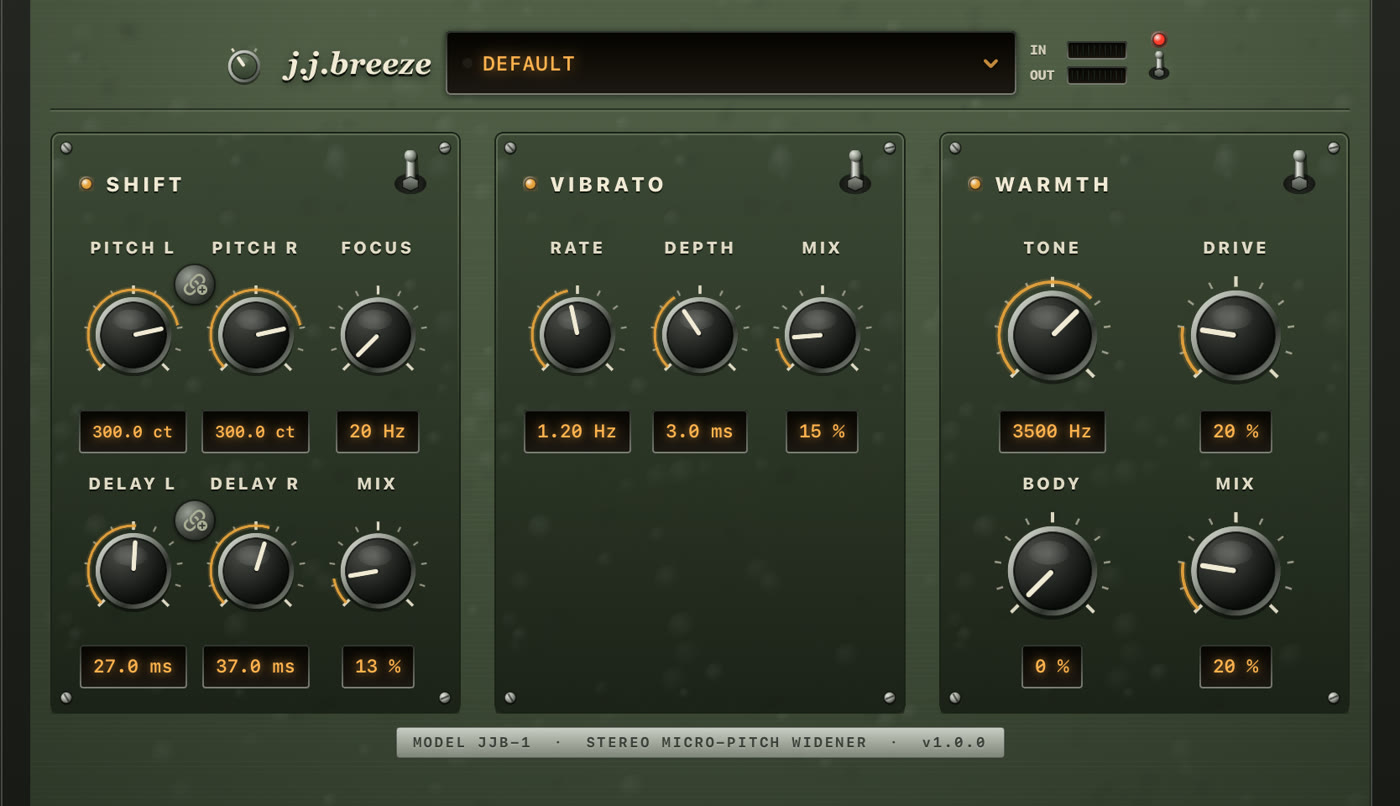
jj-breeze panel on iPad: hammered green plate with Shift, Vibrato and Warmth on screwed-down sub-plates

Free · 7-day trial · then $2.99 once  ·  Open the app, tap Play, then load jj-breeze in your host


The sound it was built for

Three shapes of the same voice

Close to the mic. A guitar in the room. A double that doesn’t announce itself. Load a preset and you’re in that neighborhood — original patches, not copies of any record.

The breeze

Easy. Always been there.

Matching pitch, short delays, a darker top. The namesake — that unhurried doubled voice the whole plug-in is named for. Start on Default.

Moon

Darker. Slow swirl.

The same close vocal, rolled off and moving just enough. Warmth on, vibrato low and lazy. Load JJ Moon.

Lies

One side lifts.

Left stays put. Right jumps +470 cents. Asymmetric, a little ghosted. Load JJ Lies.

jj-breeze is an original effect. Preset names point at a feel, not a recreation of any recording, and the plug-in is not affiliated with any artist, label, or third-party vendor.


Simple by design

Up and running in 3 steps

The companion app is a real host, not an empty wrapper. Hear the effect before you open a DAW.

01

Open and tap Play

Install jj-breeze and launch it once. Leave the source on Demo Loop and tap Play. You hear the effect immediately — turn knobs, throw a section switch, load a preset.

02
🎛

Load it in your host

That first launch registers the Audio Unit. In GarageBand, Logic for iPad, AUM, and other AUv3 hosts it appears as jj-breeze (manufacturer Gerov).

03

Pick a preset — or one section

Each section has its own on/off. Turn Vibrato and Warmth off for a clean slap or octave; leave them on for a darker, moving vocal. Knobs stay put when a section is off.


In a host

Real hardware, drawn from scratch.

Hammered enamel, screwed-down sub-plates, bakelite knobs in chrome collars, bat switches and smoked-glass readouts — all drawn procedurally, so it stays sharp at any size your host gives it. Tap a screenshot for a larger view.

jj-breeze on iPad in the Field Green finish
iPad — Field Green
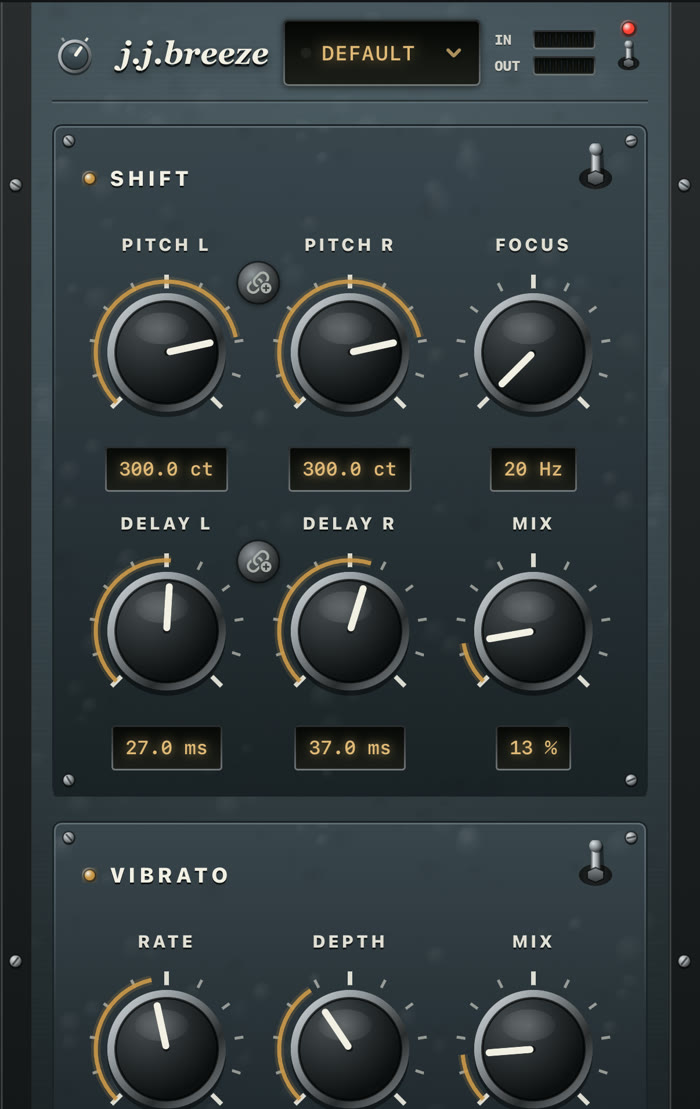
jj-breeze on iPhone in the Slate finish, sections stacked
iPhone — Slate
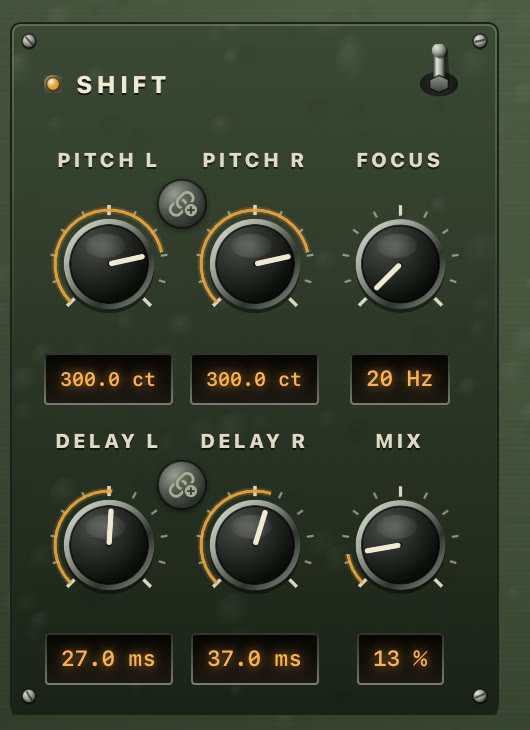
Close-up of the Shift sub-plate: bakelite knobs, printed scales, LED readouts
Shift, up close

Shift · Vibrato · Warmth

One insert, three jobs

Shift and Vibrato blend in parallel from the dry signal. Warmth is the last pass on the sum. Turning one up does not eat the others.

Shift

The core. Each side gets its own pitch and its own delay tap. Same-sign pitch stays mono-compatible. Opposite signs is classic micro-shift width. Focus is a crossover: below it stays dry; only the band above is shifted and delayed.

  • Pitch L / R — −1200 to +1200 cents
  • Delay L / R — 0 to 250 ms (short width or slap)
  • Focus — 20 Hz to 10 kHz
  • Mix — dry/wet for this section only

Vibrato

A slow, continuous pitch wobble from a swept short delay — not a second copy of Shift’s static detune. It runs in parallel with Shift, from dry, so Mix here never steals from Shift Mix.

  • Rate — 0.1 to 8 Hz (slow vocal swirl ~1.2 Hz)
  • Depth — 0 to 8 ms of delay sweep
  • Mix — hint of movement, or a real vibrato

Warmth

The last tone stage on the fully summed signal: chest, darkness, then gentle saturation. Not another doubler. Leave it off when you want an open, twangy top.

  • Body — low-shelf at 150 Hz, up to +6 dB
  • Tone — low-pass, 500 Hz to 12 kHz
  • Drive — soft tanh after the filter
  • Mix — how much of the warmed signal you hear

Focus keeps the low end

Raise Focus to keep width off the bass. Drop it toward 20–25 Hz when a big pitch change or a slap should cover the full band. Mix only blends; Focus decides what gets processed.

Link Pitch and Delay

On iOS, link L and R so one drag keeps the offset. Double-tap a knob for its default. Tap the LED readout to type a value. Vertical drag is coarse; horizontal is fine.

Section on/off

Each section has its own bat switch and indicator lamp. Throwing it bypasses that section without wiping knobs — the DSP keeps running, so switching back is click-free. The power switch in the header is a full dry bypass.

Two panel finishes

The rotary selector left of the wordmark turns the panel from Field Green to Slate — hammered military enamel or blue-grey gunmetal, with the hardware and lamp colours to match. Its cap shows the fitted finish, and your choice is remembered.

Presets from the panel

The preset window is the whole workflow: tap it for factory and user presets, Save As… to keep the current knobs, and swipe a user preset left to rename or delete it. A dot next to the name lights when you have edited a preset.

▮▮▮

IN and OUT at a glance

Two LED ladders in the header, green through amber into red, so you can see the effect is getting signal and what it is handing back — without leaving the plug-in window.
Factory presets

Start from a sound, not a blank panel

Same recall in the panel’s preset window and in the host. Save As… keeps your own next to the factory ones; swipe one left to rename or delete it.

Default

The breeze: matching +300 cents, short delays, all three sections on. The easy doubled voice.

Stereo Width

Opposite-sign pitch for a classic wide micro-shift, still with a light swirl and warmth.

JJ Moon

The dark, rolling one. Matching pitch, lazy vibrato, Warmth on. Start here for that late vocal.

JJ Lies

One side stays. The other lifts +470 cents. The ghost in the right channel.

JJ Dark Vocal

Matching −300 cents, Focus down, a darker Tone and a little vibrato.

Octave Width

Pitch L −1200, Pitch R at 0. Reads like an octave pedal across the stereo field.

Deep Baritone

Pitch −700 cents with Body and Drive for a low, growly voice. No vibrato.

Slapback Twang

Pitch at 0, Delay 110 / 115 ms, Focus down. One bright repeat, nothing else.


Audio Unit

Where it shows up

Install the app, open it once, then look for jj-breeze in any AUv3 host. Type aufx, subtype Jjb3, manufacturer Grov.

GarageBand

Audio FX → Audio Unit Extensions → jj-breeze. Works on an Audio Recorder track or any audio track.

Logic for iPad

Audio Units → Gerov → jj-breeze. Same editor, same presets as the standalone app.

AUM and others

AUM, Cubasis, BeatMaker, and other AUv3 hosts list it as jj-breeze. Open the companion app once if it does not appear yet.

Close to the mic. A second voice a few cents off. Never a chorus.

Put that vocal on your track.

iPhone and iPad · iOS 17+ · Free download, 7-day trial, then one-time unlock. No account. Open the app, tap Play, then load the same effect in your DAW.

Download on the App Store